Picture this: you’re standing in a Japanese pharmacy at 9pm, desperately trying to find something for a splitting headache, surrounded by shelves of mysterious bottles and packets covered in kanji you can’t read. Your host family is asleep, your Japanese colleagues have gone home, and Google Translate is giving you bizarre results like “head thunder medicine” and “brain pain destroyer.” This was my reality during my first month in Nagasaki in 2019, and it taught me one crucial lesson: not all translation apps are created equal.
Over my five years teaching English in Japan, I became something of a translation app connoisseur out of necessity. From deciphering medical forms to understanding complex train announcements, these digital tools were my lifeline in countless situations. Some apps saved the day, others left me more confused than before, and a few became so essential that I still use them today, years after returning home.
If you’re planning a move to Japan, choosing the right translation apps can make the difference between confidently navigating daily life and feeling constantly lost in translation. Here’s everything I learned about the best translation tools available right now, tested in the real world of Japanese daily life.
DeepL: The Undisputed King of Translation Quality
Let me be clear from the start: when it comes to pure translation accuracy, DeepL reigns supreme. During my time in Nagasaki, I discovered this gem in my second year, and it completely changed how I communicated with my Japanese colleagues and students’ parents.
The difference in quality is immediately obvious. Where Google Translate might give you a technically correct but awkward translation, DeepL provides natural, nuanced language that actually sounds like something a native speaker would say. I remember preparing for a parent-teacher conference about a particularly challenging student. Using Google Translate, my carefully crafted explanation came out as “The child has energy problems in classroom time.” DeepL rendered the same sentiment as “Your child has difficulty focusing during lessons,” which was infinitely more professional and tactful.
DeepL’s strength lies in understanding context and tone. It grasps subtle differences between formal and casual Japanese, something crucial in a culture where using the wrong level of politeness can be mortifying. When I needed to write formal emails to the Board of Education, DeepL consistently provided appropriately keigo-laden text that impressed my supervisors.
The app excels at longer passages too. While other translators struggle with complex sentences, DeepL maintains coherence and flow across paragraphs. I used it extensively for translating school newsletters to send updates to my family back home, and the results were so natural that my mum commented on how “eloquent” the Japanese school system’s communications were.
However, DeepL has one significant limitation: no photo translation feature. This means you can’t simply point your camera at a sign, menu, or document and get an instant translation. For text-heavy scenarios, you’ll need to manually type everything in, which can be cumbersome when you’re trying to quickly understand a restaurant menu or figure out what’s in that intriguing-looking ready meal at the convenience store.
Google Translate: Your Swiss Army Knife
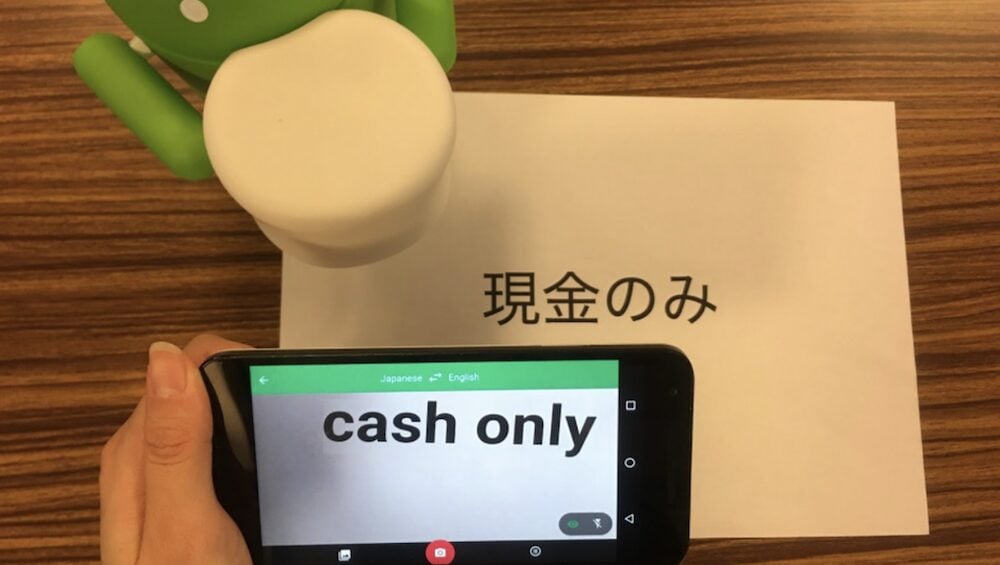
Despite DeepL’s superior accuracy, Google Translate remained my most-used app throughout my time in Japan, and for good reason. Its photo translation feature is genuinely life-changing when you’re navigating a country where text is everywhere and often indecipherable to foreign eyes.
The camera function works remarkably well with Japanese text. Point your phone at a sign, menu, or document, and watch as the app overlays English translations directly onto the image in real-time. I’ll never forget the first time I used this feature at a local izakaya in Nagasaki’s Shianbashi district. The entire menu transformed before my eyes, revealing dishes I never would have discovered otherwise.
The app’s conversation mode proved invaluable during medical appointments. You can speak in English, and it provides Japanese audio output, then listens for the Japanese response and translates it back. During a particularly concerning visit to the dentist, this feature allowed me to communicate complex symptoms and understand the treatment plan without needing to bring a translator.
Google Translate also works offline, which saved me countless times when I found myself in rural Kyushu with spotty internet connection. You can download language packs in advance, ensuring you’re never completely stranded without translation help.
The handwriting recognition feature deserves special mention. Japanese people often write things down to help foreigners understand, and being able to draw kanji characters on your screen and get instant translations is incredibly useful. My elderly neighbour, Mrs. Yamamoto, would often leave handwritten notes about neighbourhood events, and this feature helped me stay connected to community happenings.
Microsoft Translator: The Underrated Competitor
Microsoft Translator doesn’t get the attention it deserves, but it offers some unique features that made it essential during group situations. The app’s live conversation feature allows multiple people with different phones to join a single conversation, with real-time translation for everyone involved.
This proved invaluable during my school’s international exchange events. Students, teachers, and visiting families could all participate in the same conversation using their own devices, with each person seeing translations in their preferred language. The technology felt almost magical, breaking down language barriers in real-time.
The app also offers excellent voice translation with natural-sounding speech synthesis. During phone calls with utility companies or when making restaurant reservations, I could hold the phone up to my device and get clear, audible Japanese translations that sounded professional and polite.
Japanese-Specific Champions
While international apps dominate the market, several Japan-focused translation tools offer specialised features that proved incredibly useful during my stay.
Yomiwa became my go-to for reading practice and kanji recognition. Unlike general translation apps, Yomiwa is designed specifically for Japanese learners. Its camera can recognise individual kanji characters and provide detailed information including stroke order, readings, and example sentences. When I encountered unfamiliar characters during my daily newspaper reading practice, Yomiwa helped me not just translate but actually learn the characters for future use.
The app’s handwriting recognition is superior to Google’s for Japanese characters. You can draw kanji with your finger, and it provides multiple possible matches along with readings and meanings. This feature was particularly helpful when elderly students wrote characters I couldn’t identify in my adult education classes.
Shirabe Jisho isn’t exactly a translator but rather a comprehensive Japanese dictionary that became indispensable for deeper understanding. When translation apps gave me a word but I needed to understand its nuances, connotations, or proper usage, Shirabe Jisho provided detailed explanations, example sentences, and cultural context.
The app includes pitch accent information, which most translation apps ignore entirely. Understanding how words should be pronounced with proper intonation helped me sound more natural when speaking, and my students often commented on improvements in my pronunciation after I started using this feature regularly.
VoiceTra, developed by Japan’s National Institute of Information and Communications Technology, offers specialised translation for travel and daily life scenarios in Japan. What sets it apart is its focus on practical, everyday conversations that foreigners actually need.
The app includes pre-programmed phrases for common situations like visiting hospitals, dealing with police, or handling apartment maintenance issues. During a heating breakdown in my Nagasaki apartment during a particularly cold February, VoiceTra helped me communicate the problem to my landlord and arrange repairs without any confusion.
Real-World Application Strategy
Through trial and error, I developed a multi-app strategy that served me well throughout my five years in Japan. For formal communications like emails to supervisors or important documents, I’d write in English, translate with DeepL, then double-check specific phrases with Shirabe Jisho for cultural appropriateness.
For immediate needs like reading menus, signs, or product labels, Google Translate’s camera function was unbeatable. When I needed to understand complex spoken Japanese, Microsoft Translator’s conversation mode provided the most natural interaction flow.
For learning and retention, I’d use Yomiwa to look up unfamiliar kanji I encountered, helping me gradually build reading comprehension rather than just getting quick translations.
Choosing Your Translation Toolkit
For anyone moving to Japan, I recommend downloading multiple apps and learning when to use each one. DeepL for important communications where accuracy matters most. Google Translate for instant visual translation and general daily use. Microsoft Translator for group conversations. And at least one Japanese-specific app like Yomiwa for learning and deeper understanding.
Remember that these apps are tools, not crutches. Use them to facilitate communication and learning, but also invest time in studying Japanese properly. The apps will help you survive and thrive during your early months, but genuine language skills will transform your entire experience in Japan.
The technology available today makes living in Japan more accessible than ever before. With the right translation apps in your digital toolkit, you can navigate everything from complex bureaucracy to casual conversations with confidence. Just don’t forget to charge your phone before heading out, I learned that lesson the hard way during a particularly confusing trip to Nagasaki’s city hall on a day when my phone died just as I reached the front of the queue.